How to install GNURadio and RTL-SDR on Raspberry Pi
Why
Someone asked me to help him setting up GNURadio on Raspberry Pi for a cool project (might be published here in the future).
I thought that would be easy but it didn’t.
I spent hours trying to build stuff like PyBOMBS just because GNURadio doesn’t have sources for RTL-SDR dongle.
Steps
I found a way to do it pretty easy.
Not sure if you can use Raspbian but I tried it with Ubuntu.
- Download Ubuntu for Rpi here:
https://ubuntu-pi-flavour-maker.org/download/
Choose “Ubuntu Classic Server 16.04
Raspberry Pi 3 (216MB)“. - Flash it on MicroSD card using Etcher or Win32DiskImager, 16GB recommended.
- Login using username and password ubuntu and change your password.
- It’ll exit so go back and login.
- Update stuff:
sudo apt-get update - Enable audio on Ubuntu:
sudo nano /boot/firmware/config.txt
Add:dtparam=audio=on - Reboot.
- Install GNURadio (take some time):
sudo apt-get install gnuradio gnuradio-doc gnuradio-dev - Install GQRX-SDR:
sudo apt-get install gqrx-sdr - Open MobaXTerm and login to your Pi.
- Type:
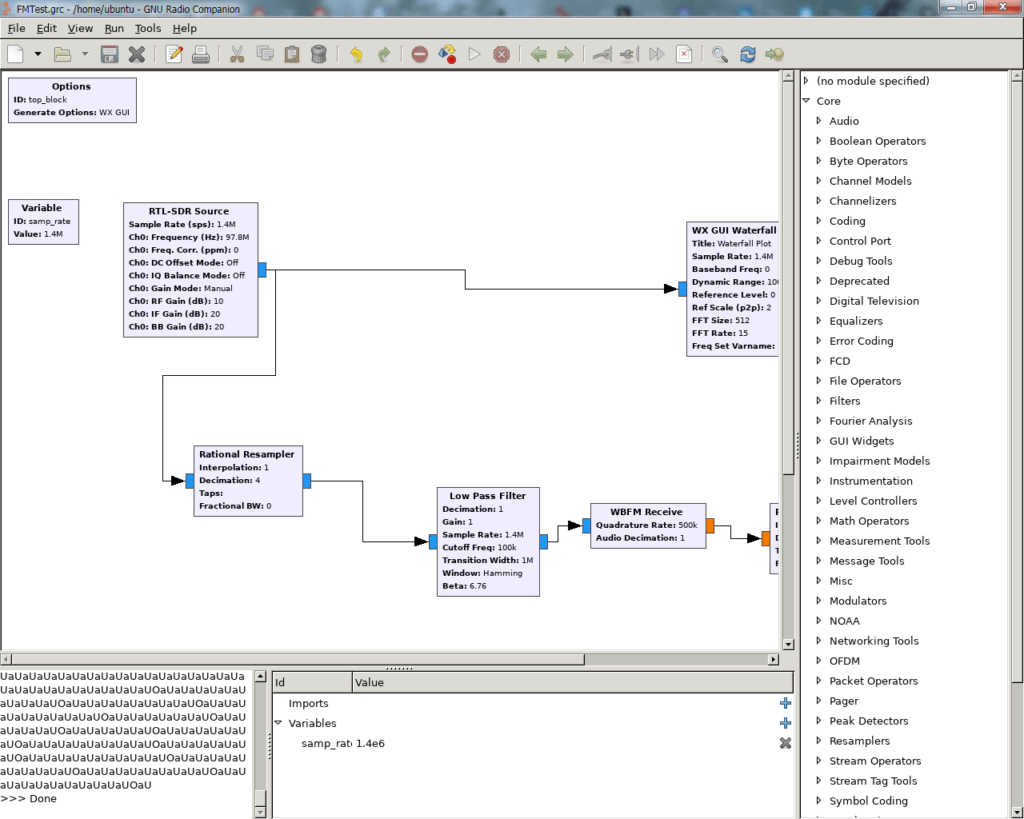
gnuradio-companion & - The GNURadio window should open.
- You can find your RTL-SDR source under (no module specified) then Sources.
That’s it.
I used X11 Forwarding (basically GUI over SSH) with MobaXTerm because it has a native support for it.
You can test your audio on the RPi by installing aplay:
sudo apt-get install alsa-utilsThen using
aplay /usr/share/sounds/alsa/Front_Center.wav command to play a test file.
Good luck and 73!